


In Part 1, I wrote about the foundations and access layer for the agent architecture we’ve been putting together at Gradient Works.
Here’s a quick recap.
Our goal is to be an agent-first company where agents do the vast majority of the hands-on work. That means humans stop being responsible for doing tasks and focus on being accountable for the quality of the work.
To achieve this, we’re building a unified framework that enables two types of agents: assistants that help people do their jobs and teammates that perform entire roles. One early realization: none of this will be possible if we don’t build security and safety guardrails from the beginning. A system that minimizes the risk of catastrophic mistakes gives us freedom to operate1.
This combo of unification and security informed our gw CLI approach to the access layer. Agents access our business systems (e.g. Salesforce, HubSpot, BI tools, Google Workspace) through a command line interface that offers a single point of control for authentication, authorization and action.
Access, however, isn’t enough. Think about an SDR task like “prospect these 10 companies”. The rep needs secure access to tools (LinkedIn Sales Nav, Salesforce). They also need context (ICP, personas, market knowledge) and skills (the right sequence of steps to fully research a prospect). A rep without all that would fail and so will an agent.
Today, I want to show how we complement our agent access layer with these other pieces. Here’s a simple visual of our overall stack:
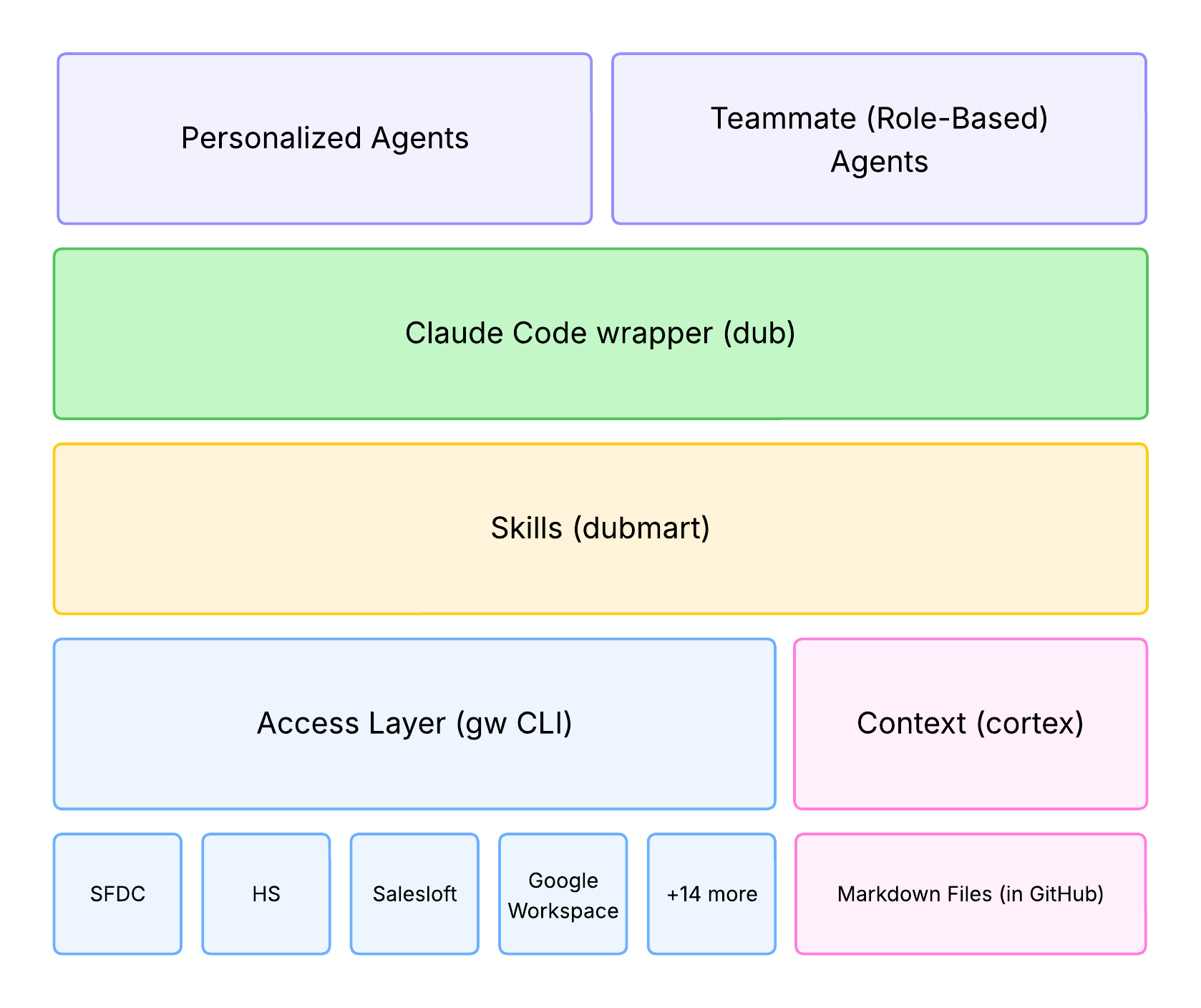
The rest of this article focuses on contextual knowledge (pink) and task-specific skills (yellow). I’ll cover the general concepts and provide detail on our specific implementation.
A caveat: our approach is a work in progress. It’s not perfect and it may not be right for you. My hope is that sharing what we learn as we go will contribute to all of us—especially in GTM—figuring out how to wrangle this new reality.
Let’s dig in.
Context
Context is the knowledge an agent needs to act appropriately across a variety of situations, irrespective of a specific task. For our agents, I think about two kinds of contexts:
Company Knowledge - When you onboard an employee, you give them baseline knowledge to orient them. Think about things like org chart, company history, market positioning, types of customers, core values, etc. You do it because it’s the context an employee needs to inform everything they do as someone who works at your company. You don’t expect someone off the street to have this knowledge, so you teach them.
Role Knowledge - An engineering employee needs to know different things than a marketing employee. The engineer needs to know coding standards and database schemas. The marketer needs to know personas and attribution criteria. And they won’t know what’s right at your company unless you tell them. Some companies have formal trainings for this stuff; others expect employees to just absorb it on the job.
AI agents don’t have either kind of knowledge. If you don’t tell them, they’ll guess—just like an employee. Unlike employees, they don’t have a good way to just absorb information as they go2. You need to explicitly “ground” them by giving them the context they need when they need it.
Our solution to this problem is a lot like our solution to everything else so far: a CLI + some markdown.
Cortex: a work in progress with a cool name
We’ve built a system for accessing and sharing context across agents called Cortex. There are two parts:
An organized way to store and distribute knowledge files (in markdown, natch)
A utility (gw cortex) to help agents find the right knowledge when they need it
Every agent gets a “cortex” folder. Inside that folder are sub-folders, each of which we call a “source”. Inside each source is a set of organized markdown files containing some knowledge. The exact set of folders and markdown files is up to the author.
Here’s an example from my personal agent:
cortex
├── gradient-works
│   ├── Company
│   ├── Customer Success
│   ├── Engineering
│   ├── GTM
│   │   ├── Audience Guide.md
│   │   ├── Brand Guide.md
│   │   ├── Competitive Landscape.md
│   │   ├── Competitors
│   │   ├── Dynamic Books.md
│   │   ├── Gaps.md
│   │   ├── Messaging Guide.md
│   │   ├── Point of View.md
│   │   ├── Pricing and Packaging.md
│   │   ├── Product Marketing
│   │   ├── Proof Points.md
│   │   ├── README.md
│   │   ├── Sources
│   │   └── Voice and Tone.md
│   ├── Product
│   └── README.md
├── opportunities
│   ├── Closed-Won
│   ├── Company 1
│   ├── Company 2
│   ├── README.md
└── uncharted-territory
    ├── posts
    └── README.md
So far, so normal. There’s a wrinkle here, though. The gradient-works folder is actually a git submodule with content from a remote GitHub repository, while the other folders only exist for the specific agent.
This submodule thing means we can update our company-wide knowledge files in one GitHub repository3 and then sync them to all our agents. For example, we recently added a bunch of product marketing content and now we can make that available to everyone’s personal agents as well as our growth marketing, prospecting and outbound agents.
We wrapped some tooling around this in gw CLI, so an agent can get the latest information by running “gw cortex sources pull”.
Now that we’ve got a way to structure knowledge and keep it up to date, we need a way to ensure that the agent can find what it’s looking for. For that, we added search4 to gw CLI. An agent might construct a call like this:
$ gw cortex search "ideal customer profile ICP" \
  --sources gradient-works --limit 2 --output-format json
{
  "results": [
    {
      "source": "gradient-works",
      "path": "gradient-works/GTM/Audience Guide.md",
      "heading": "Audience Guide > The Four Personas",
      "line": 65,
      "snippet": "## The Four Personas"
    },
    {
      "source": "gradient-works",
      "path": "gradient-works/GTM/Audience Guide.md",
      "heading": "Audience Guide > Quick Qualification Checklist",
      "line": 10,
      "snippet": "## Quick Qualification Checklist\n\nA prospect is worth pursuing if they meet **all required** criteria and **most** of the strong signals:"
    }
  ]
}
This helps guide the agent to the exact parts of files that contain particular knowledge, saving both tokens and time.
It’s a good start, but I don’t think we have search fully dialed in. We have topics/keywords associated with particular files which helps boost their search ranking, but I think we’re still too likely to return some lower-quality results. When that happens, it’s not clear that our search tool beats the native file search tools that agents like Claude Code already have. We’ll keep working on it.5
Caveats aside, Cortex seems to work pretty well in its current state. It gives us a (relatively) simple, agent-native knowledge base which we can centrally update and then use across agents to inform the work they do.
And that brings us to skills, the way we teach them exactly how to do that work.
Skills
Skills instruct an agent exactly how to use your tools and your context to do a particular job. Good skills serve the same role as employee trainings. They turn an eager new hire that works hard but makes tons of mistakes into someone you can count on. The difference is that agent skills take effect immediately—it really is an “I know kung fu” situation.

Like almost everything with AI, skills seem more daunting than they actually are. They’re mostly just markdown files containing instructions tucked away in some special locations on your computer. It’s not magic.
In our case, we knew we had to both build good skills and distribute them to our employees as part of our unified approach. Here’s how we’re tackling those challenges.
Building skills or: how I learned to teach kung fu
First, I recommend getting the skill-creator plugin from Anthropic. It’s not required, but it does a great job of writing skills in ways that agents understand. If you’re using Claude Code, you can find it in the “claude-plugins-official” marketplace. You can use “/plugins” or do it in one shot with this command:
$ claude plugin install skill-creator@claude-plugins-official
Installing plugin "skill-creator@claude-plugins-official"...
✔ Successfully installed plugin: skill-creator@claude-plugins-official (scope: user)
Second, even though skills are just markdown files, I don’t recommend writing them by hand. I’ve found it’s easiest to use “on-the-job” training.
Let’s say you want an email triage skill (assuming your agent can access your email). Walk your Claude Code agent through the process step-by-step. Tell it to auto-archive certain senders, label others, send emails to spam that look a certain way, etc. Once you’ve done the walkthrough, say something like this:
Review everything we just did and turn it into a skill called email-triage
so you can help me do this job more efficiently in the future. Use skill-creator
to ensure the skill follows best practices. You can skip evals.
(That last line ensures the skill-creator skill doesn’t get too fancy and try to do a complex skill quality evaluation—that’s almost always overkill.)
Once you do that, Claude will write a pretty darn high-quality skill for you. (You may need to give it permission to update its own settings before it can complete this.) You can, of course, read the skill yourself and make manual tweaks if you want.
Later as you do email triage with your agent, you may notice it’s not using the skill when you think it should, it’s not handling things quite right, or you just want to add a new capability. When that happens, tell it how you want it to behave and ask it to update the skill accordingly. If you’re not sure what to tweak you can ask it. Say, “You didn’t do X just now. How can we update our skill to ensure you always do X when Y happens?” It’s very similar to managing a human—when you see them go down the wrong path, correct them so they learn for next time.
This process works great for building skills. The end result, though, is a skill that’s stuck on your computer. It’s not something you can easily share with others. Given our goal of a unified framework, we realized we needed a way to distribute reusable skills to multiple people.
Luckily Anthropic had already solved that problem.
Welcome to Dubmart: quality skills at everyday low prices
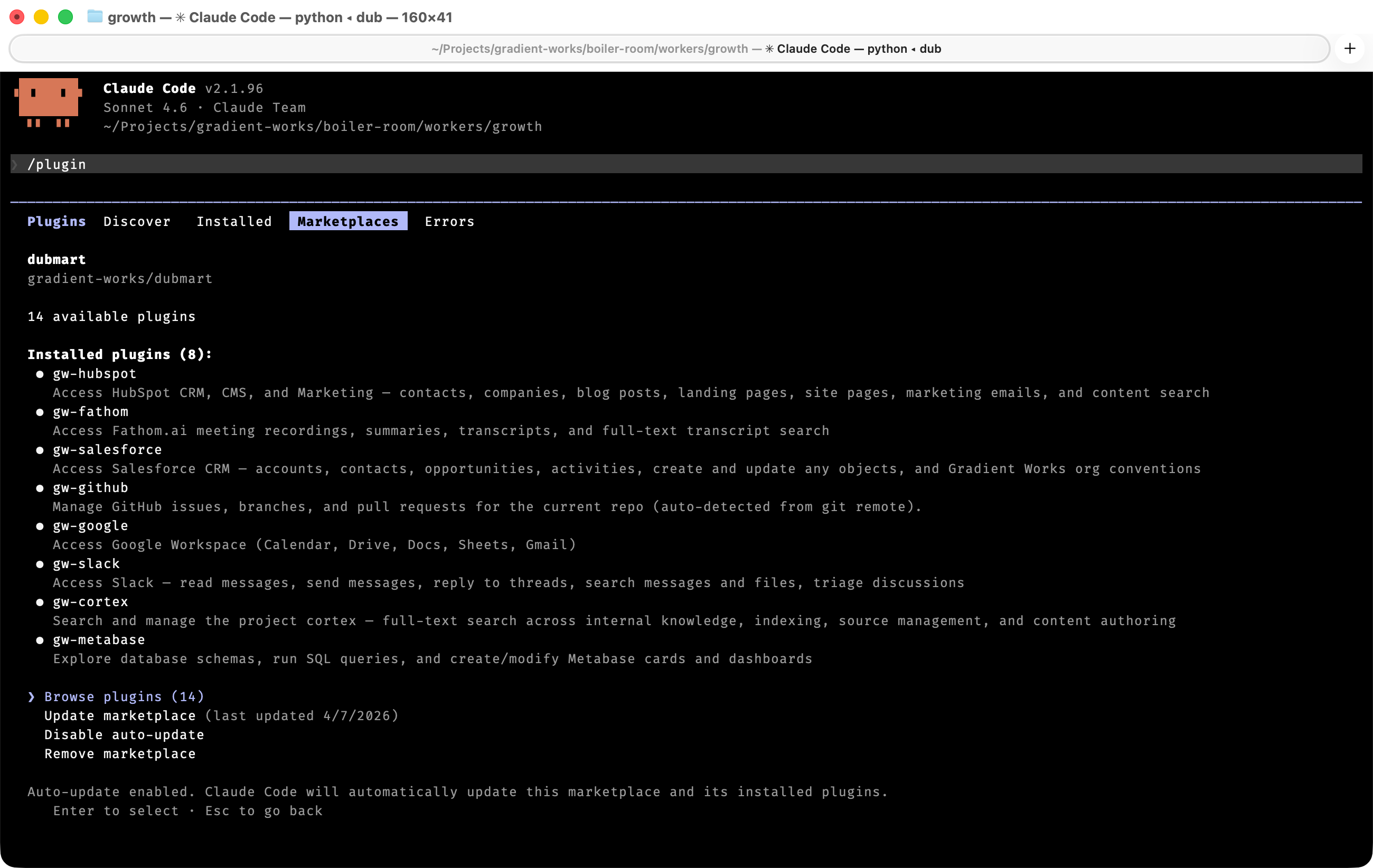
Plugins offer a way to upgrade Claude Code’s capabilities with MCPs, subagents and—you guessed it—skills. You can distribute them via a “marketplace”.
We built an internal Claude Code plugin marketplace called Dubmart6. So far, most of our plugins provide shared skills centered around particular business systems. They explain how to use gw CLI, describe Gradient Works-specific customizations, outline common access patterns and explain how to find relevant context.
A few examples:
The “gw-slack” plugin has a skill that describes how to use our gw slack command and also explains our Slack conventions. This includes things like key team channels (e.g. #gtm and #engineering), how to identify shared customer channels and other conventions (e.g. “opp-*” channels for open opportunities).
The “gw-salesforce” plugin has a skill that knows how to fetch and update Salesforce data. It also knows the specific fields and calculations we use to compute ARR and retention.
The “gw-fathom” plugin has a skill that knows how to intelligently find sections of Fathom transcripts based on user requests by chaining together different calls to “gw fathom search”. It also includes a specially tuned subagent for summarizing many transcripts at once.
The “gw-linkedin” plugin includes skills that know how to use the LinkedIn website, building on top of the excellent agent-browser command line tool.7
Now, whenever we build a useful skill we want to share across the company, we can just publish it to Dubmart. If we want to upgrade a skill, we update the plugin and all the agents using that skill automatically get smarter.
The full setup for a private plugin marketplace is a little beyond the scope of this newsletter but it’s pretty straightforward. Mostly you just need a GitHub repository and a few specific files. Like everything else, we use Claude Code help us maintain the repo itself.
Enabling folks to connect to a private GitHub marketplace can be a little tricky since it uses git behind the scenes to fetch the plugins. That’s ok for us because every employee has git and GitHub access. That may be a blocker for your team, so talk to your engineering folks. Once that’s sorted, your users can add the marketplace using the “/plugins” command and start downloading plugins.
Wrapping up
That’s it for the context and skills part of our architecture. Cortex gives us an agent-friendly knowledge base for company and role knowledge. Dubmart gives us a way to share skills. Combine those pieces with the gw CLI access layer and we’ve got a solid framework that’s working well in practice across a number of roles.
The biggest weakness is it’s still pretty “developer-y”. Users will encounter rough edges or have to occasionally interact with developer-centric tools like CLIs and GitHub. Of course we live in a world where C-level folks and sales leaders are on LinkedIn posting screenshots from Claude Code running in their terminal. Maybe this is the new normal—at least for now.
Like I’ve been saying, it’s gonna get more technical before it gets better. Best to roll with it. I hope our approach sparks some ideas for your team.
Shoutout to Kristina McMillan for crystallizing this framing in a conversation last week.
This is changing at bit. Some agents will try to automatically store “memories” as they go. I have not personally found Claude Code’s implementation to work very well.
This also means all this knowledge is versioned and easy to branch, rollback and diff—just like code.
We build a search index using a local sqlite db with FTS5 for full-text search. It was easy to vibe-code.
We probably need proper semantic search.
We call our internal agent framework “dubs”, shortening “workers” in the same way the Golden State Warriors shorten their name. It’s also—ever so slightly—an allusion to Devs, a criminally under-appreciated TV show about quantum computing and artificial intelligence.