


I got tired of LinkedIn posts and newsletters about agents that don’t include any specifics. I’m going to share our agent-first journey in way too much detail over the next few posts. Hopefully you’ll find it helpful.
Today’s post is about our foundations and approach to systems access. I’ll cover context and skills next time.
Exactly two months ago, I finally had some weekend time to use Claude Code for a specific task. I’d been closely following the evolution of AI in the development space for the past two years, but I hadn’t spent real time with Claude Code.
Within 3 hours, it was obvious everything about our work had to change. We had to become agent-first across our whole team and we had to do it now.
That day triggered an all-out sprint to get as much of that transformation done as we could before my trip to Japan in mid-March. On Feb 1, a couple of our engineers were playing with Claude Code. Today, here’s where things stand across the company:
Growth - Our growth agent assists the marketing team with optimizing Google Ads1, doing web analytics2 and building landing pages.
Content - The marketing team’s agents suggest ideas, draft content, edit it and post it.
Outbound - We have a combination of agents doing prospecting and outbound outreach every single day. One qualifies, identifies contacts and does deep research. The other works through Salesloft tasks.
Sales - My sales assistant helps with meeting prep and follow up. It’s building a “pipeline brain” with the risks, stakeholders and status of each open opportunity.
Customer Success - Our CSMs have agents that summarize customer calls, synthesize next steps, and help us draft agendas for meetings.
Board Materials - We send out a weekly update to board members, investors and other stakeholders. Our agents pull together metrics, milestones and other key topics.
Engineering - Claude writes the majority of our code while also helping us draft issues, plan features and review pull requests.
So far, all that is no different from what you’ll read on LinkedIn’s infinite stream of engagement bait posts. Let me change that.
That “sales assistant” with a “pipeline brain”? It’s a skill in my personal agent that hits several different data sources (via our CLI—more on that below) and updates some markdown files with the current state of all our deals. It’s not rocket science, but it is genuinely useful.
Not all of these agents are working perfectly. For example, the Growth agent is doing pretty well with Google Ads but it can’t yet deploy landing pages because our HubSpot CLI integration (see below) can’t yet configure all the modules our theme supports. Another example: our Outbound agent still requires some human babysitting and approvals for certain actions.
In short, we’re just now scratching the surface of what’s possible. And we’re nowhere near the “autonomous agents are running our business” stories that people lie about on LinkedIn. That doesn’t mean we haven’t made some meaningful progress that’s worth sharing.
Warning, some of this will be a little technical. But, as I’ve said before, it’s gonna get more technical before it gets better. Below I’ll focus on our foundations and our—somewhat different—approach to tooling.
Let’s dig in.
Foundations
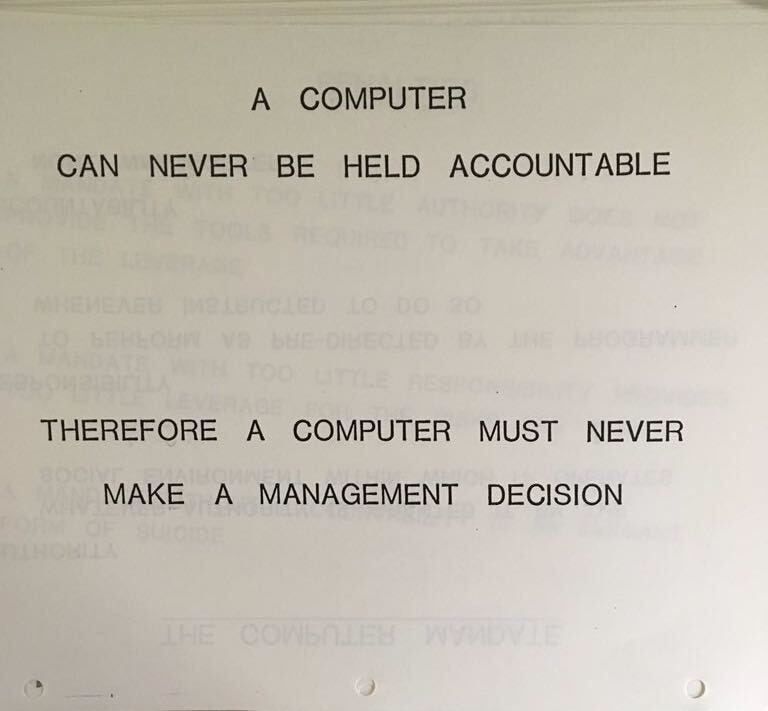
We started with a set of core requirements:
Everyone is accountable. Everyone in the company should use agents to execute their work. Each person has to move from being responsible for doing all the work to being accountable for the quality of that work.
Two categories of agents: assistants and teammates. Assistants help an individual human get their work done and are tailored to their individual needs. Teammates take on whole roles, work with others and operate as autonomously as possible.
One technical foundation. We need a unified architecture that includes the agents themselves, access to systems and data, shared context and skills so that we can continuously improve all our agents across the company.
Security from the start. We need to make whatever we build as secure as possible. That includes authentication and authorization as well as guardrails against destructive actions (e.g. deleting everything) and data exposure (e.g. sending private data to a 3rd party).
With those requirements set, we had to make some decisions. We decided to build on Claude Code across the company. Nothing in AI is permanent, so this could change. Here’s how we think about the tradeoffs at this moment in time:
Claude Cowork is less technically daunting than Claude Code but there are still some restrictions that we don’t love. In particular, the virtual machine that runs under the hood—while helping security—makes it harder to integrate with.
OpenAI Codex is immature compared to Claude (e.g. they just added plugins last week). However, they’re catching up fast. We’ll revisit this decision down the road.
OpenClaw is robust and extensible. The security situation is getting better. Right now it seems to be more “single player” than Claude and quite a bit more wild west3. That said, it may be the right fit going forward for some things, especially for more autonomous agents.
Claude Code has the right mix of configurability, security, extensibility and maturity4. Even though it’s probably best as a terminal application for developers, it has a nice UI in Claude Desktop (right alongside Cowork) which makes it reasonably approachable for everyone. Finally, Anthropic has demonstrated a strong focus on enterprise-type work so I trust them to continue down that path.
Ultimately, choosing the agent platform was the easy part. If we’d just told everyone “go use Claude Code”, we might have seen some benefits, but not much. We knew we had to actually enable the agents. As I wrote in Agent Enablement is the New Sales Enablement:
I haven’t seen too much use of the term “agent enablement” so I’ll provide my own definition. It means providing AI agents with appropriate access to business systems, sufficient information about their business context and proper skills for their job. Agents without access, context and skills are just a neat party trick with a penchant for telling convincing lies.
The rest of this post is about the work we’ve done to give our agents secure access to the business systems they need to use to be useful.
Access
The goal of the access layer (which I’ve discussed before) is to give your agents access to the same systems that humans use to do their jobs. MCPs are the most common route for this and they work well. However, they do have have some drawbacks:
They use lots of tokens to describe their capabilities, taking up precious context.
They have a lot of surface area for security issues.
Vendor MCPs tend to support less functionality than their more mature APIs. For example, Salesforce has no official MCP and HubSpot’s MCP server mostly enables querying CRM data. I’m sure this will change over time.
MCPs aren’t the only way to expose data and tools to agents though. They’re equally at home using the command line5. We’ve used that to our advantage.
Inspired by tools like the aws cli, we built a single, extensible, command line interface for all the tools that a Gradient Works agent (or employee) might need. We call it “gw”. It wraps the APIs for our business software with a reasonably consistent set of conventions and a system that securely manages credentials.
The gw CLI
The gw CLI gives us full control over what features and functionality we want to expose to our agents instead of being at the mercy of a vendor-provided MCP.
Let’s use Salesforce as an example. It doesn’t have an MCP, but it does have an expansive API that makes nearly anything in the platform possible. With the gw CLI, you can access Salesforce like this to query for data:
$ gw salesforce query \
  "SELECT Id, Name, Website FROM Account LIMIT 10"
Or like this to create a new record:
$ gw salesforce objects create \
  --object Account \
  --field "Name=Acme" \
  --field "Website=acme.com"
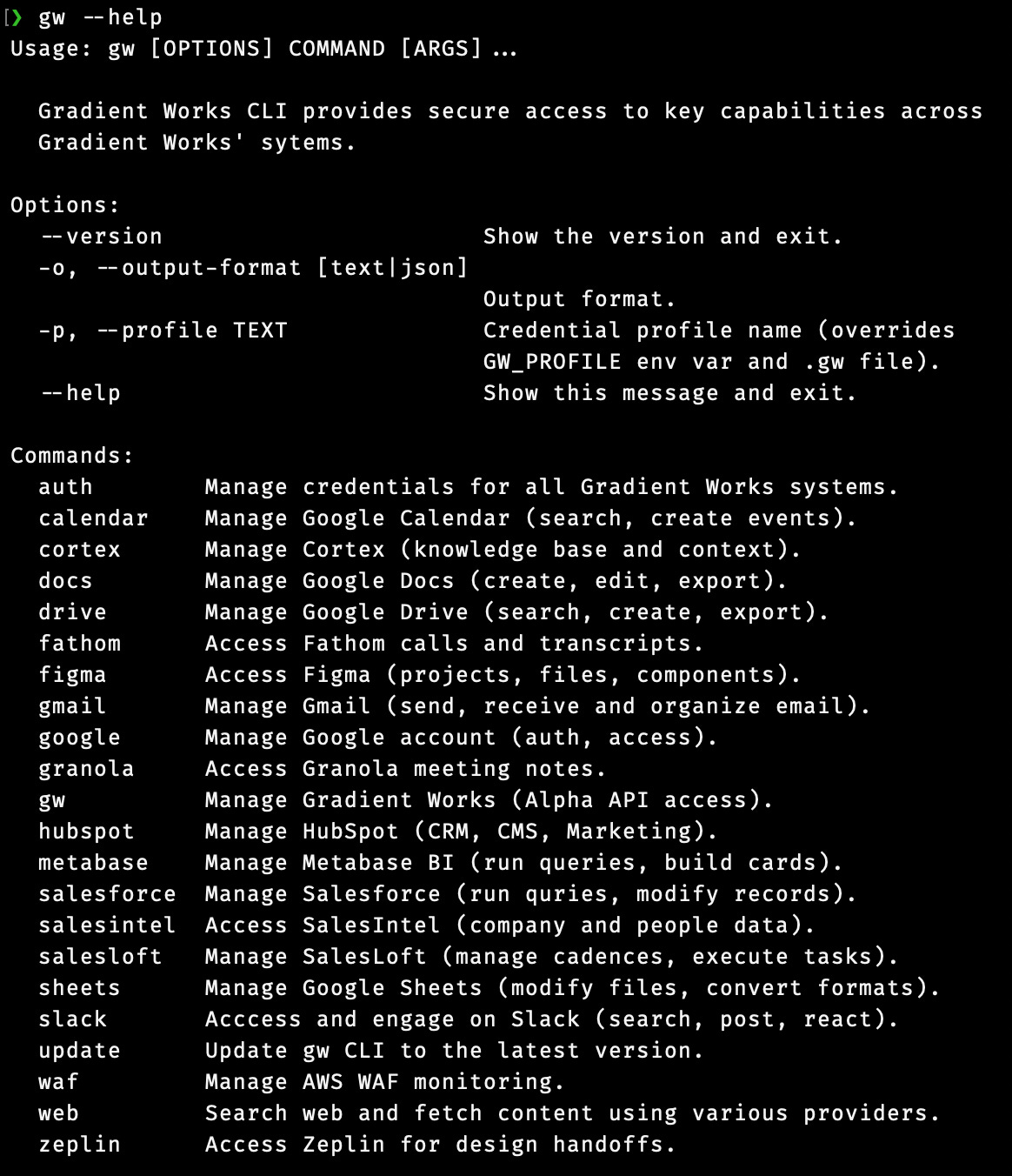
The gw CLI currently integrates with 18 different systems we use to do our work, from Google Calendar to Zeplin. You can see them here:
Token thrift
Since we’ve built our own CLI, we can control the inputs and outputs. This also allows us to customize behaviors that might be useful for agents but aren’t native to specific APIs. For example, our HubSpot CLI allows us to fetch blog posts in HTML from the HubSpot API but convert them to markdown when we output them to the agent:
$ gw hubspot posts get \
  --post-id 330007029495 \
  -o markdown
---
id: '330007029495'
title: Is it the reps or the accounts? A 3-step framework for diagnosing pipeline drops
date: '2026-04-01T17:14:38Z'
author: Manny Ruan
url: https://www.gradient.works/blog/is-it-the-reps-or-the-accounts-a-3-step-framework-for-diagnosing-pipeline-drops
---

You rolled out new territories in January, but outbound pipeline’s down....
If the above blog post was in HTML, it would use about 5x more tokens. The CLI’s conversion improves the signal-to-noise ratio for the agent while making it less likely that you’ll have to fork over money to Anthropic for session overages. With a CLI, you have a lot more control over your token budget.
Security and safety
You might notice the “auth” subcommand. This is where we manage authentication. Each system’s authentication credentials (usernames, passwords, API keys) are managed through a single set of authentication commands.
$ gw auth status serpapi
serpapi:
  SERPAPI_API_KEY    keychain: gw-cli / SERPAPI_API_KEY
Each credential is stored in either the keychain, 1password or a configuration file. They can’t be output via the CLI, only used by the code internally. This makes it much harder for secret credentials to be exposed to the LLM or any other system.
Beyond authentication and authorization, the CLI approach helps keeps our data safe. Since we build only the functionality we want to expose to agents, we can limit what’s even possible. For example, our Salesforce CLI integration doesn’t have the ability to delete an object. Why risk it?
Building your own
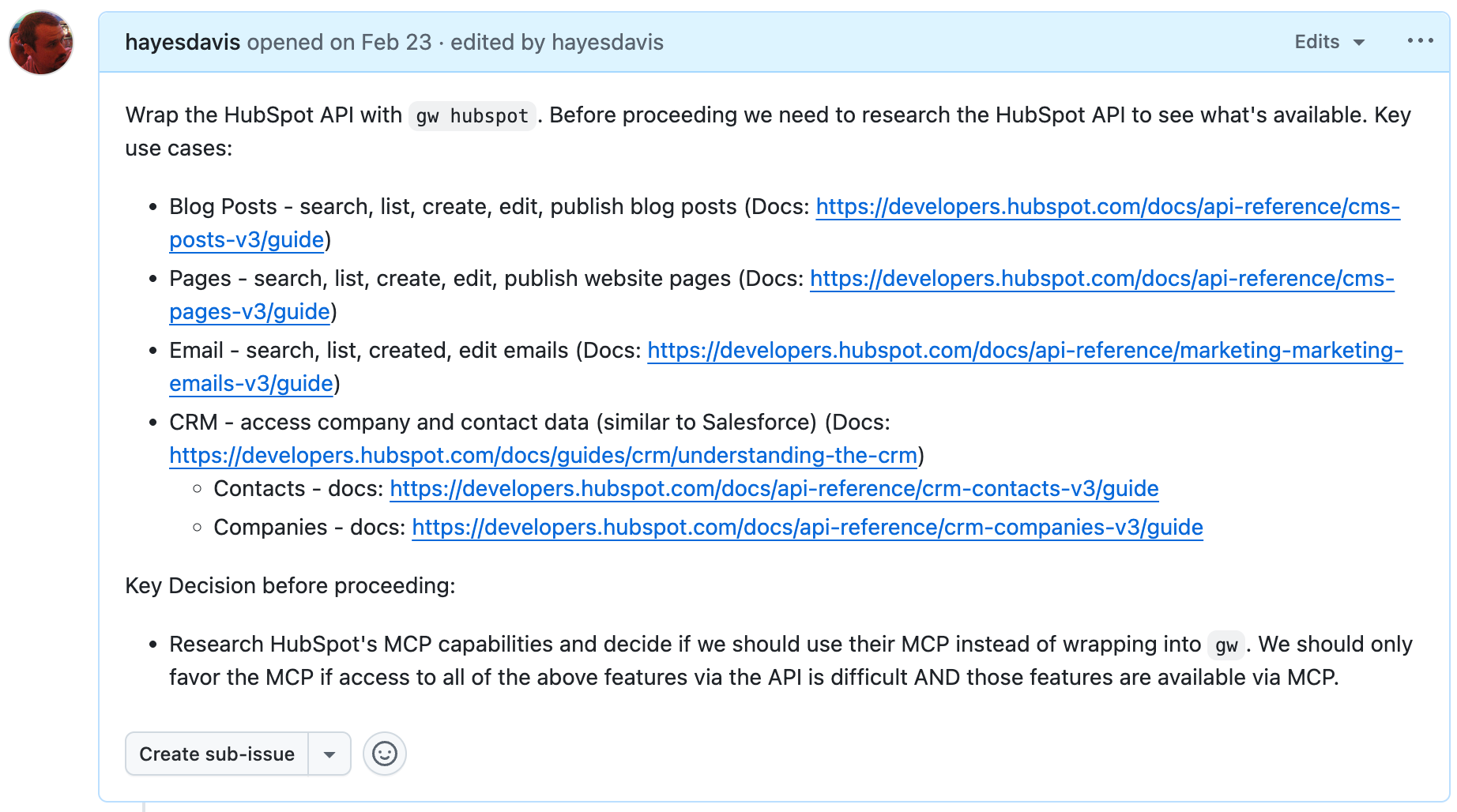
This might sound like a lot of work. In reality it’s been relatively low lift. We built the entire CLI using Claude Code itself. For the vast majority of these APIs, you can literally tell Claude Code where to find the API docs, tell it which things you want to enable and have it go from there.
For example, here’s the initial description I gave Claude to build the HubSpot part of our CLI:
Using with agents
We built the gw CLI in python. Since we use the standard project structure, we can use uv (recently acquired by OpenAI) to install it. It looks something like this:
$ uv tool install "git+https://github.com/{your-org-name}/{your-repo}"In our case, this makes “gw” available to any agent running on the computer.
You’ll also need to add something like this to CLAUDE.md or AGENTS.md:
# Systems Access

When you need to access external systems, you **must** first look for a
relevant skill and invoke it to learn how to access the system.

If you are unable to find a relevant skill, you may attempt to fall back
to the `gw` CLI directly. `gw` is a command that is globally available
to you on your PATH at all times. It provides access to various sytems.
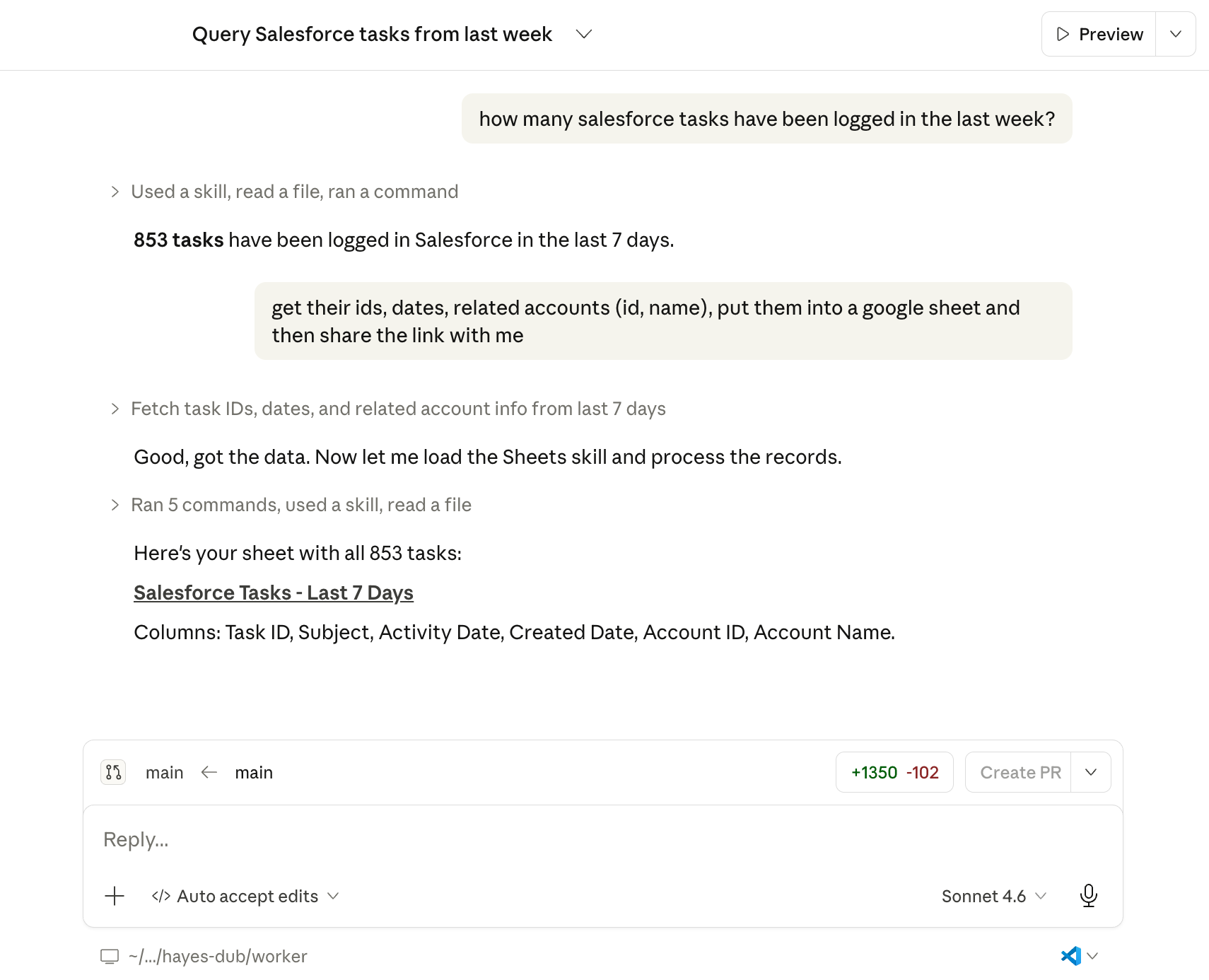
I’ll discuss more about how we pair skills with the CLI in the next article. With all that in place, you can do things like this:
Drawbacks to the CLI approach
There are real tradeoffs and drawbacks to rolling your own CLI. To name a few:
There is more tooling within the agents themselves for MCPs. This is partly because MCPs are more complex than a CLI, but it does mean that it might be harder for non-technical users to understand what’s going on.
Our current deployment approach with uv means that all our users have to have access to developer tools like uv, python and git—as well as access to GitHub. At our scale, that’s not a big problem. It might be for you. It’s nothing an afternoon with Claude Code building better packaging couldn’t solve, but that might not be your cup of tea.
Right now, Claude Cowork and CLI tools don’t play nice. It very much prefers MCPs. That’s one reason we’re not currently trying to push our non-technical users to use Cowork instead of Code.
While agents are pretty good at using the help output of CLI tools to figure out what to do, you’ll get more efficient usage if you ship skills along with the CLI6. This somewhat negates the token benefit that CLIs have over MCP, but it’s still probably a win.
Last but certainly not least, you need to build and maintain the CLI yourself. That means fixing bugs and adjusting to any vendor API updates. Claude makes that 100x easier than it would have been in the past, but it’s not nothing.
Wrapping up
We haven’t gone 100% CLI for access to everything. For example, we’re using the Google Ads MCP server for ad analytics. That said, it’s fairly limited so we may find ourselves wrapping the Google Ads API in the gw CLI soon.
Despite the (very real) tradeoffs, the gw CLI approach to systems access has served us well. We’re rarely hitting token limits, we don’t have to manage a menagerie of 3rd party MCPs, we can be pretty confident in our security and we’ve been able to easily extend it whenever we need new functionality. Now that we have most of our important systems covered, we can quickly spin up new capabilities. I think this investment will continue to compound.
Next week, we’ll cover how we’re providing context and memory to our agents, as well as our approach to shared skills.
Using the Google Ads MCP server plus a skill we built.
I’m not buying a stack of Mac Minis.
Maturity is a relative term in a category that has existed for about 9 months.
Whenever Claude Code searches, reads and edits your files or executes programs, it’s just executing command line tools.
More on this next week.
Already a human and fantastic start
Thanks for sharing! We are also building an agent that accesses tools and skills via CLI. But unsure if different to your setup - we embed CLI commands into skills and tool reference files. Makes for a more consistent agent. Excited to read about your approach to skills!