


Welcome to the 3rd and final post about The Composable GTM Ecosystem. If you’re still with me, I appreciate it. I know these posts have been a little more technical and a little less GTM than most of my other posts. (More on that in just a moment.)
In the event you haven’t read Part 1 and Part 2 I’ll give you a quick summary.

In Part 1, I argued that B2B GTM tech is becoming less monolithic and less CRM-centric. Instead, the smart GTM operators are “composing” solutions from best-of-breed building blocks.
In Part 2, I talked about how these operators are actually composing these parts together using various approaches to building workflows. My prediction is that this emerging orchestration layer will probably look more like the agents powered by Claude Code or OpenAI Codex than the more traditional (though AI-inflected) workflow tools like Clay or n8n.1
In today’s post, I want to wrap up the series by talking about what GTM teams need from software so it can plug into their orchestration layer. As you’ll see, software that works well in a human-first ecosystem built around siloed user interfaces looks very different from software designed to be a building block in a larger system.
We’ll get to that.
But first, a slight digression about being a GTM leader in 2026 and the changing technical skills that requires.
It’s always most technical before the dawn
I’m afraid that GTM is about to get a lot more technical before it gets better. Workflow tools and AI agents are too good to ignore. The problem is they’re also still very technical products.
I’ve seen a lot of folks on LinkedIn who didn’t know what a command line was two weeks ago running autonomous agents with full access to their computers. It hasn’t always gone well.
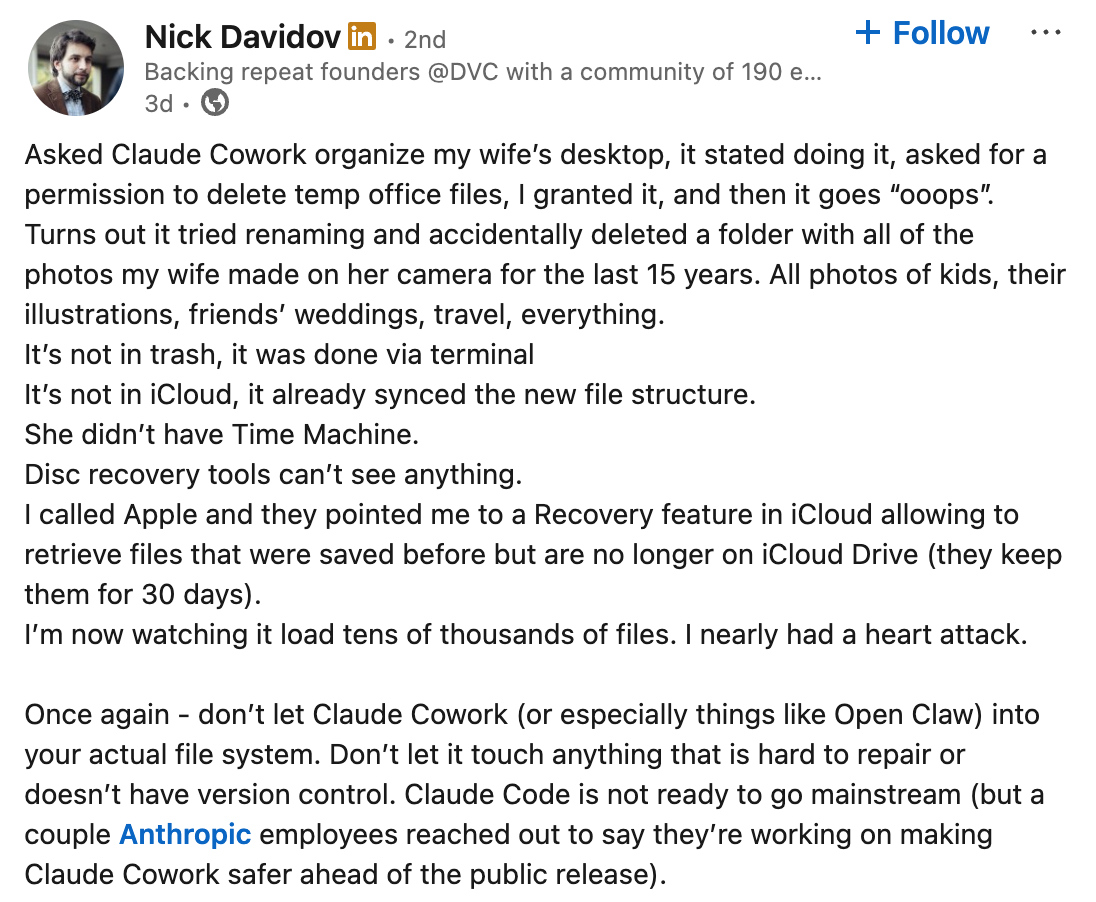
These kinds of workflow and agent systems sit in this weird netherworld at the intersection of developer tools, consumer products and business software. Historically most developer tools start out as extremely rough proofs of concept and usually only encounter an audience that’s technically prepared to handle it.
Consumers and business users rarely ever encountered these kinds of tools, even after they stabilized and became polished. If they did, they were wrapped in layer-upon-layer of product packaging and user interface. AI? Not so much.
That said, you can’t let this stop you. The tools can do amazing things now and if you’re not figuring out how to harness that, a competitor is. These tools will eventually get easier to use and more approachable for non-technical users. Unfortunately, you can’t wait that long. I’m sorry if you’re “non-technical” but it’s time to get more comfortable with your filesystem, command line tools, APIs, etc.
Now back to the—fairly technical—rest of this post.
Interfaces for users or machines?
Going forward, software should have two primary interfaces: one for users and one for machines. This has been true for a while, but the user interface mattered a lot more than the machine interface.
The composable GTM ecosystem puts these interfaces on equal footing: APIs (Application Programming Interfaces) are just as important as UIs. Without an API, a piece of software simply can’t be composed into a workflow.
In Part 2, I described the CRM as a compromise:
The CRM represents a compromise, one that combines GTM data, workflows and user interface into a single product. Until recently, those things were so intertwined that the only way to do any one of them effectively was to tightly couple all of them together.
That description doesn’t just apply to CRM, but to B2B SaaS products generally (all 40k+ of them)—which includes the vast majority of GTM tech. Every one of these products is really built to automate some kind of specific workflow for some specific set of users who work directly in the product. In the process, it captures data and (hopefully) does something of business value. SaaS is simply packaging up data + workflow + UI and delivering it as a service.
If all goes well (from the SaaS vendor’s perspective) the software becomes a system of record, making it very sticky for customers and producing a nice long-term revenue stream for the vendor. To do that, the software needs data.
Therefore, vendors are most motivated to get data into their systems, not out. The best way to get data in? Have users enter it in. The best way to get users to do that? Focus on the user interface. And wouldn’t you know it, that’s where most product managers spend their time. Sure they may talk about jobs to be done and users wanting holes not drills but the answer is always some form of “make the job possible by clicking around in our product”. The vast majority of products are inherently UI-first.
Composition with workflow tools turns that whole deal on its head. When you use a workflow tool or AI agent to get things done, you don’t want to use the user interface. Humans are pretty good at clicking around on little pictures and words that represent things we want to do. Machines, less so. They can, but it’s pretty inefficient.
You also don’t just want to put data into the software. To compose building blocks together, you need those blocks to do things based on inputs and help you get data out—all so you can send that data along to other tools so they can do their thing.
Luckily we already have some technology for doing all this: APIs. These allow pieces of software to interact directly without a human being involved. I know this isn’t new. I’m sure you’ve encountered APIs before—most GTM software has them—and used them in various ways. If nothing else, you’ve probably used your CRM’s API to connect with other parts of your stack.
Here are two things to know about APIs:
APIs are often second-class citizens. Since most SaaS applications are primarily concerned with the UI, the APIs come second. There are things you can do or access in the UI that you can’t do or access with the API. Or the API changes more slowly than the UI. Sometimes this is intentional—prioritizing stability for existing integrations—and sometimes it’s just that the PMs don’t care as much about the API.
APIs are a bit like websites—no two are alike. They have standards for how you access them and some basic building blocks for sharing information2, but each individual one is different. Just like each website has different layouts and buttons, each API has different ways of manipulating data. Knowing how one API works does not mean you know how another API works3. And, unlike websites, APIs don’t give you helpful labeled buttons to discover what’s possible. The system using the API needs to know exactly what it can do and how to do it.
The first point means that just because a piece of software offers a capability and an API, there’s no guarantee you can effectively use it within your orchestration layer.
The second point means that APIs are fine if you’re building a tight integration between two systems that’s not meant to change much—engineers can read the documentation and code up everything to work just so. This is often exactly what you want! Marketo better reliably send leads to Salesforce and Clay should always sync data to HubSpot without random errors.
This also works pretty well for more traditional workflow tools like Zapier, n8n and Clay. With the user’s help (and some pre-built integrations), they can plug into lots of different APIs to connect various systems together. Of course, those workflow vendors have to maintain all those integrations, but that’s their problem, not yours.
Agents can easily talk to these APIs if they know what to say. However, the uniqueness of each API makes it harder for AI agents to quickly discover capabilities on the fly and use them. Advanced agents are good at reading online API documentation to figure out what’s possible, but that’s slow and expensive.
There are some attempts to solve that last problem which, predictably, involves another acronym: MCP (model context protocol). MCP is a sort of hybrid between a text-based UI and an API built specifically for helping AI agents learn what they can do and then enabling them do it. Today, most MCPs are just slightly-more-agent-friendly wrappers around APIs. MCPs may not be the long-term solution4, but something similar will probably emerge5 and that too will most likely rely on APIs.
In short, a building block in your workflow is only as good as the API it offers. GTM tech vendors will need to compete on the quality of their API as much (or more) as they compete on the quality of their user experience6.
How to evaluate an API
So, what does good look like for an API? I’ve used a lot of APIs in my life as a software engineer and as a GTM operator. Below are some practical questions you can use to evaluate a product’s API to determine whether it might fit into your composable GTM workflows:
Can you get data out as well as in? Ensure the API allows you to get access to all the important data contained within the product.
Can you do everything in the API you can do in the UI? Sometimes certain features and capabilities from the UI aren’t available via the API. For example, if the UI lets you search, the API should let you search as well.
What limits are there? Many APIs have “rate limits” that prevent you from accessing things more than a certain number of times over a period. This can sometimes be a big restriction, as anyone who’s dealt with running out of Salesforce API calls can attest to.
Is it well documented? - If the online docs are complete and well organized, it’ll be relatively easy for you to configure workflows that use the API. It’ll also be relatively easy for agents to read the docs and figure out how to talk to the API.
Do they offer an SDK or programming language libraries? These tools make it easier to access the API, handling some of the details for you. It’s not required, but agents can build on these if they’re available.
Does it take security seriously? - You should expect the API to use standard authentication mechanisms like OAuth and/or HTTP header-based API keys. Can those keys be tied to specific users and revoked? Is there a robust permissions model for authorization that can, for example, make it so certain users can read data but not change it?
Can you test it out? Just because a capability is documented doesn’t mean it works as advertised. Make sure you can actually test the API in something resembling your real workflow before making a big commitment.
How is the data licensed? This is mostly related to a specific kind of GTM API—data enrichment. Make sure you know what you’re allowed to do with any data during your contract and after termination.
If a product’s API scores well across all these criteria, it likely means it’s composable and will plug nicely into your orchestration layer. If not, you need to make sure it has enough value on its own and that you can dedicate enough resources to use it solely through the user interface.
Wrapping up
It’s a brave new world out there for those of us building GTM tech stacks. The era of CRM-centrism is waning. The new model that’s replacing it—composing best-of-breed services using AI—is more complex and more technical, but far more powerful. It’s worth the tradeoff.
Side note: I mentioned last Thursday morning that Opus 4.5 and GPT 5.2 were breakthroughs in agentic capabilities. By that afternoon, Anthropic and OpenAI had each announced Opus 4.6 and GPT 5.3-codex, respectively. Having spent a week with Opus 4.6 in Claude Code, I can attest that it’s incredibly good.
Both websites and APIs use HTTPS to send data back and forth. Think of this as the mail system with envelopes and addresses. What’s inside the envelope varies a lot. Websites usually send HTML in their “envelope” which defines the content of a given page for your browser to turn into a UI. APIs usually send something called JSON which is a way to structure data. If you know a lot about this stuff, please don’t yell it me for oversimplifying.
There are patterns, of course, but that only helps a little.
Though MCP support is pretty broad, I’m not particularly bullish on it being the future solution for this problem. There’s some serious security issues and MCPs eat up a lot of expensive tokens. Something will emerge, though, because it needs solving.
Right now the cool kids seem to be building Skills that use CLIs. Who knows what they’ll be doing next week.
Yes, I recognize B2B SaaS isn’t known for fantastic UX. That said, it’s gotten a lot better over the years. There are plenty of sales people out their touting ease of use vs their competitors.