


Consider this a 3rd installment in my Actual Agent Architecture series (see part 1 and part 2) where I discuss our adventures making Gradient Works an agent-first company.
Today I want to share work we’ve been doing to make our outbound agent produce copy that’s both well written and relevant to the recipient. We’ve got a ways to go yet, but we’ve made meaningful progress.
First, a disclaimer. I don’t use AI to write these articles. If you think something sucks (like the title of this piece), it’s because I blew it and/or am corny, not because of AI slop.1
Speaking of slop… about 18 months ago, I said using AI SDRs was disrespectful. That was true in September 2024. The state of the art at that time was sending garbage to people’s inboxes at scale. In 2026, we have real agents with strong reasoning capabilities, access to historical relationship data and large memories. It’s definitely possible to use AI to do good outreach. People (and AI) can change.

About two months ago, we started experimenting with agentic outbound. I am vehemently not building a spam cannon. Instead, I want to build a system that can do a better job running relevant outbound campaigns than any human ever could.
Humans, after all, are limited in time, attention and the ability to distill relevance from lots of context. You try listening to 4 hours of calls or reading a quarter’s worth of company announcements and writing 2 crisp sentences that correctly connect the main topics to your value proposition. AI, however, does that extremely well.
Given the right access, context and skills, an AI agent should be able to do a better job for most messaging than a human would.
Armed with that thesis, I just needed a platform. I figured, why not use Claude + a headless Salesloft? Yes, that old crusty legacy platform. I know there are AI SDR platforms out there but a) we already have some Salesloft licenses, b) it has a surprisingly comprehensive API that I can connect to with our CLI2, c) I’ve already got Claude Code and d) I don’t want to spend Jordan Belfort money.
Once I got the first version wired up, it worked. The messaging it produced, however, was pretty meh. If I let it draft more than a couple sentences within a fixed template, it just came off as “too AI”. I know this because I review (and edit, if needed) every single one before it sends.
Someday I want to have this thing operating with less me-in-the-loop and that’s not gonna happen if it’s sending slop. So I set out to make it much better at writing.
Setup and eval loop
I decided to start with a reconnect cadence because it’s important to get this messaging right. After all, these are folks you may have met with many times before in a previous sales cycle. It’s also hard to make reconnect emails super-templatized without losing relevant nuance. It’s a great use case for AI, but only if it can write well.
Here’s how I set things up inside Claude Code:
The main agent fetches all the tasks in the Salesloft queue, organized by cadence and account
For each account:
An account-draft-planner agent pulls in writing instructions and context and then drafts messages for each Salesloft task, storing each message in a markdown file.
An account-draft-editor agent pulls in its own instructions, reads each message file and suggests edits (if any), logging the suggestions in the file.
The main agent incorporates the edits and produces a new draft if the editor requests it. Then that draft gets sent back to the editor for another pass. This happens up to 3 times.3
When all was said and done (about an hour of chugging away in auto mode), I had a list of pre-drafted messages that represented the best the agents could do without my help.
After that, I went through the actual process of reviewing and sending the messages. The system goes through each one and presents the draft to me to approve or make changes. If I make changes, it logs those changes to the file.
Sadly, I had to make a lot of edits. Which I dutifully did for close to 50 emails over most of a full day. It sucked.
However, now I had a corpus of good copy AND the changes it took to get from semi-slop to sendable.
From there, I asked Claude to analyze the edits from both the editor agent and me. Then I had it group them into categories. Ultimately this is what we came up with:
Composition and style - writing that sounds like slop
Knowledge errors - factual mistakes and hallucinations
Knowledge gaps - missing information I had that wasn’t available to the agent
Once I was satisfied with the analysis, I had Claude generalize all the suggested edits into rules which we used to update the reference files and subagent definitions for the planner and editor.
The rest of this article details the things we caught and how we tweaked them.
Composition and style
Any attempt at high-quality agentic outbound copy has to overcome two very big hurdles: AI-voice and sales-voice.
We know the AI tells:
A “breezy” tone with short, choppy sentences which sound like a replacement-level B2B marketer suffering from terminal LinkedIn Brain
Generic buzzwords like “leverage”4
Empty prefixes meant to add emphasis like “Here’s the thing:” or “Let’s be clear:”
The dreaded “it’s not X, it’s Y” (aka the “rhetorical reframe”)
And—of course—the em-dash.
Sales-voice has its own tells:
Waging war on pronouns.5 In an effort to make emails as short as possible, “I saw X” becomes “Saw X” and “We reviewed Y” becomes “Reviewed Y”.
The low-effort CTA question like “Worth a look?”, “Open to 15 minutes?”
Faux relevance like “Congratulations on what you’re building in <broad industry>!” followed by the non-sequitur pivot, “We help companies <do unrelated thing>”
Aggressively lowercased subject lines. “quick question, hayes” indeed.
And this is just the relatively good outbound. My inbox is a cosmic gumbo of terrible grammar, poor formatting and failed variable replacements.
After reviewing the edits, this is the set of style-based anti-patterns that Claude and I came up with:
**Anti-patterns to avoid:**
- Generic buzzwords: "unlock," "supercharge," "leverage," "empower,"
  "streamline"
- **Rhetorical reframe:** "That's not X, it's Y" / "This isn't about X.
  It's about Y." / "Where we're different is…" / "What makes us unique
  is…" — reliable AI tell. Delete the setup, keep the second half, or
  rewrite entirely.
- **Vague ownership claims:** "That's our sweet spot" / "That's where we
  shine" / "That's what we do" / "That's the slice where X fits" /
  "That's where we tend to land" / "That's the gap we close" / "That's
  usually where we can help" — says nothing. Let the product description
  stand on its own.
- **Filler emphasis:** "Here's the thing:" / "Let's be clear:" / "Here's
  why that matters:" — just say the thing.
- Passive voice
- Warm-up openers and filler reasons-for-writing: "I hope this email
  finds you well" / "Been a while" / "Hope you're doing well" /
  "Reaching out because" / "Coming back around because" / "Following up
  on my note from earlier"
- Apologetic CTAs: "no pressure either way" / "happy to walk through" /
  "whenever works for you"
- **Em-dashes.** Don't use em-dashes (—) in outbound copy. The fragment
  after the dash has a specific grammatical relationship to the main
  clause — find the right conjunction or preposition and integrate it, or
  split into two sentences. Don't let the integration produce a run-on.
I want to give a special callout to em-dashes as the last bullet point there.
First off, it’s pretty funny that the rule itself is written in such a way that it violates the rule. When I asked Claude about this, it suggested it was more efficient this way as an instruction. ¯\_(ツ)_/¯
I like the occasional em-dash, but I don’t like how AI sprinkles them everywhere. I’m not alone. Em-dashes are probably the number one pet peeve people have about AI writing. Personally, I’ve spent quite a while battling em-dashes with my AI prompts and haven’t quite succeeded—but this time I had a breakthrough.
My agent was generating a lot of copy like this:
You met with [REP] last October — the focus was on EMEA pipeline coverage.
I would much prefer something like this:
You met with [REP] last October. The focus was on EMEA pipeline coverage.
Fed up, I got a bunch of examples, showed them to Claude and asked what exactly the em-dash is doing, grammatically. Claude informed me it’s acting as a sort of all-purpose concept connector. It either connects two different independent clauses (like the above example) or it replaces something called a subordinating conjunction. That was a new one for me! According to Grammarly:
A subordinating conjunction is a word or phrase that links a dependent clause to an independent clause. This word or phrase indicates that a clause has informative value to add to the sentence’s main idea, signaling a cause-and-effect relationship or a shift in time and place between the two clauses.
Grammarly has a handy list of subordinating conjunctions in the linked article. They’re words like as, because, since, when.
So, you can just replace something like:
Things went quiet after that — the new CRO was focused on other FY26 priorities.
with a nice little “because”:
Things went quiet after that because the new CRO was focused on other FY26 priorities.
Ultimately that led to the em-dash busting rule you see above. If you’re dealing with two independent clauses, just make them separate sentences. Otherwise, just find a nice subordinating conjunction. It seems to work. Finally!
Fresh off my victory over the em-dash, I then turned to an arguably more pressing matter: lies.
Knowledge errors
You can coax AI to write like a normal human, but if the stuff it says is wildly incorrect, you’ll still look like an idiot. This is why context is so important.
And the worst way to look like an idiot is to talk about your own company incorrectly.
As I was editing, I noticed two emails with bizarre errors. Both mentioned two Gradient Works products that most definitely do not exist: “Bonsai” and “Bullseye Books”.
I asked Claude to help figure out what happened. In both cases, it turns out we had a Salesloft note referring to “BB”. Internally, we sometimes use that to refer to Bookbuilder. Apparently the agent simply made up a product name that it felt might be applicable to the initials “BB”.6
These kinds of hallucinations used to be incredibly common with AI. Now it’s rare that a modern model will make this kind of mistake if given appropriate context. In this case, the error was due to missing context. I had forgotten to explicitly tell the agent to reference cortex (our agent knowledge base).
The fix was relatively straightforward. Claude suggested adding something like the following to the skill file:
**Don't invent product names.** The canonical product features live in
`cortex/gradient-works/GTM/Product Marketing/Features/`. If you're unsure which feature
fits a description, describe the capability instead of naming one. Never infer a
product name from an abbreviation in account/person notes.
Most of the time enabling AI really is like enabling a person, but not always. I wouldn’t necessarily expect a new employee to know for sure what “BB” meant. However, I would expect them to stop and ask if they were unsure. AI will typically plow through and hazard a guess unless you tell it not to.
I also noticed another kind of error, this time caused by irrelevant context. A couple emails talked about pipeline numbers and rep counts. Lucky for me, I was in some of those calls and those metrics didn’t sound quite right. I went back and compared the email to the call transcripts. Lo and behold, those metrics were never discussed.
After more debugging, it became clear the agent was conflating pre-call research notes saved in Salesloft with notes about discussions that actually occurred.
I’m still working on how to fix this one. I think the solution will involve two fixes:
Tell the agent that newer context supersedes older context
Add more explicit guidance about what context comes from verified conversations vs what’s research or speculation
Finally, this cadence showed where we have gaps in getting context from one agent to another. One of our agents generates detailed summaries of our closed opportunities. I originally used that to distill basic discussion points which I added as account notes in Salesloft for the outbound agent. It looks like this:
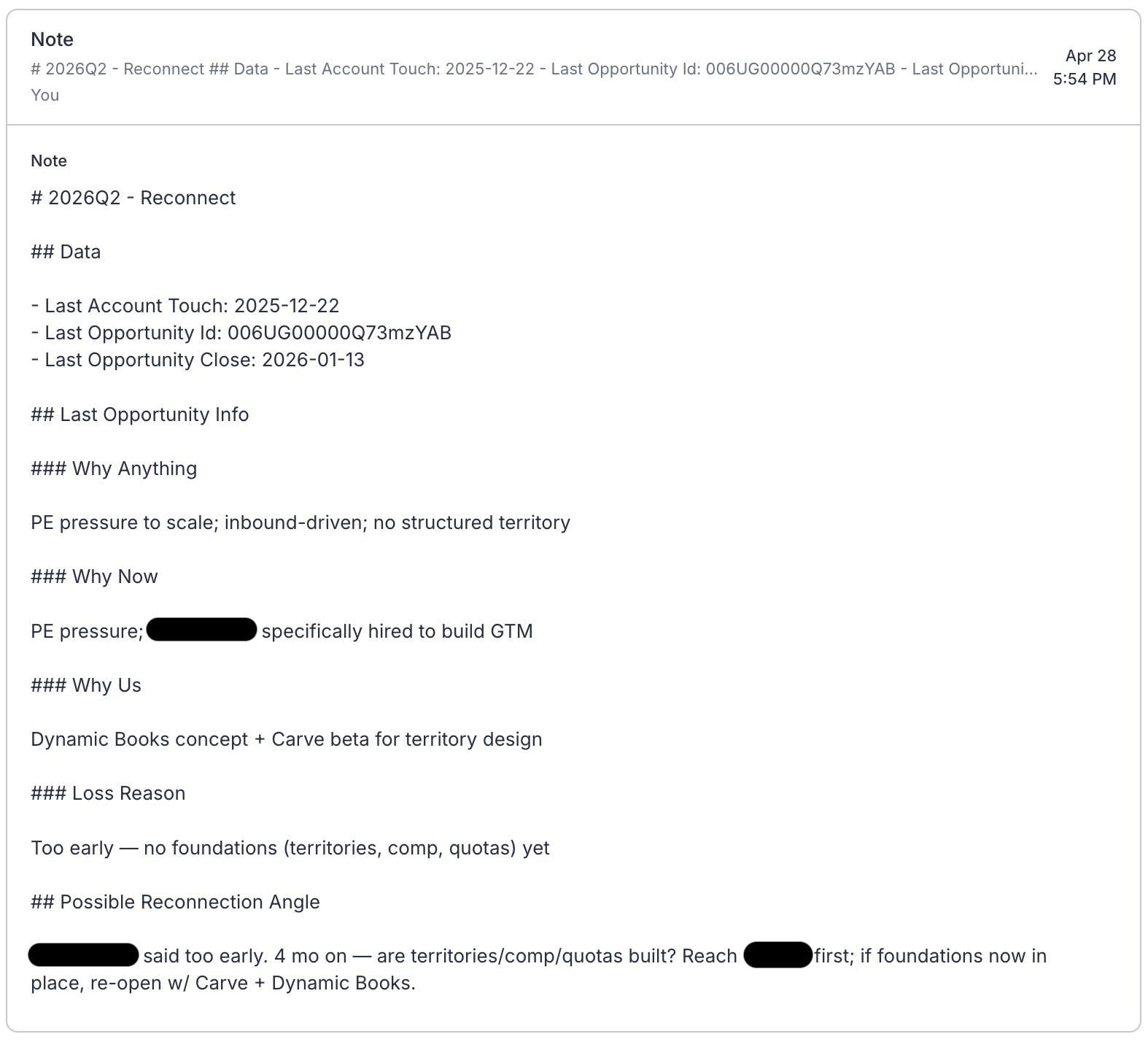
Unfortunately, that just wasn’t enough detail on the previous sales cycle for the level of detail I wanted in the copy. In particular, I really needed more data about meeting dates and attendees. Otherwise, the agent just tied everything to the last touch. To fix that, I found myself schlepping draft emails over to the opportunity agent to validate against its more comprehensive opportunity data context.
Next time, I’ll either distill down less or just give the outbound agent direct access to the full opportunity detail.
All these issues come down to context we had available but didn’t use properly. Another—more challenging—problem is context we don’t yet have accessible to our agents.
Knowledge gaps
The final problem was incorporating information from a) conversations that happened out of band and b) external signals.
As I evaluated messages, I could sometimes recall information that simply wasn’t available to the agent. This included emails that hadn’t been synced into Salesloft, LinkedIn DMs and actual memories of in-person conversations. This information led to complete rewrites to turn factually-correct-but-dry “reconnect” emails into messages between friends. Some of those (like the unsynced emails) are easy fixes. Some of the others (like recollections from an IRL lunch), not so much.
External signals are something we just need to get better at. I’d done some light enrichment before starting outreach, but I still found several hooks on LinkedIn that ultimately made me rewrite agent-drafted emails.
At some point there are diminishing returns to trying to gather every piece of context. Not everything in life can be documented in a markdown file. Humans aren’t great at remembering precisely what was said in a meeting 6 months ago but many of them (especially in sales) excel at maintaining social networks. That alone may be a reason to keep humans in the loop.
Wrapping up
You should take two big things away from this post.
First, it’s possible to defeat the em-dash using the power of grammar.
Second, agent enablement is hard work, just like it is for humans. Just tossing an agent at the problem won’t work (clearly). It requires real upfront investment in giving it what it needs to do a good job. It’ll be a slog, but I’m convinced my pipeline will thank me.
I recently heard AI slop defined as “content that takes longer to read than it takes to produce”. I can assure you that none of these articles fit that definition unless you’re a very slow reader.
This is good because their MCP is super-primitive.
This is a very dumb version of an actor-critic model.
Did you know you can just say “use”?
No, not that war on pronouns.
How it arrived at “Bonsai” is unclear to me.